Hugo Pereira
Project 2: Sysmon Integration and Endpoint Visibility
Objective
To provision a Windows 11 endpoint within the localized lab network, neutralize its native Endpoint Detection and Response (EDR) capabilities via advanced evasion techniques, and instrument the OS to forward high-fidelity kernel telemetry to the Wazuh SIEM.
Methodology
1. Provisioning & Localized Isolation
I provisioned a Windows 11 Enterprise Evaluation VM (LAB-TST-WIN-01) on the custom NAT network (192.168.74.20).
Bypassing Windows 11 Cloud Account Requirements:
During the Out-of-Box Experience (OOBE), the OS mandated a Microsoft cloud account login, which violates the strict isolation requirements of a localized malware testing lab. To bypass this consumer-level restriction, I accessed the OOBE command line (Shift + F10) and executed the start ms-cxh:localonly bypass. This forced the system into a localized setup workflow, allowing me to provision a standard offline administrative account (adm-hpereira).
2. Advanced EDR Evasion (Neutralizing Microsoft Defender)
To prepare the endpoint for future malware simulation, the native EDR (Microsoft Defender) had to be completely disabled. However, the evaluation ISO suffered a catastrophic GUI failure, rendering the Windows Security dashboard completely inaccessible.
Defeating Tamper Protection & Self-Healing Mechanisms:
When attempting to disable Defender via PowerShell and Group Policy (gpedit.msc), the system’s kernel-level Tamper Protection blocked the execution. Furthermore, opening native OS applications triggered a watchdog fail-safe that resurrected the WinDefend service.
To achieve persistent evasion, I executed an advanced defense evasion technique:
- Booted the endpoint into Safe Mode to prevent the
WinDefendservice and its associated kernel drivers from loading. - Encountered hardened Access Control Lists (ACLs) in the Windows Registry where keys were locked by
TrustedInstaller. - Executed a Privilege Escalation tactic, taking explicit Ownership of the registry containers and assigning Full Control permissions to the local Administrators group.
- Disabled the startup types (
Start=4) of the Early Launch Anti-Malware driver (WdBoot), the File System Filter driver (WdFilter), and the main engine (WinDefend), severing the core dependencies of the antivirus engine and permanently blinding the EDR.
3. Telemetry Instrumentation
Standard Windows event logs lack the granularity required for advanced threat hunting. To capture high-fidelity telemetry (Process Creation, Network Connections, File Modifications), I deployed Microsoft Sysmon utilizing the industry-standard SwiftOnSecurity configuration XML.
4. SIEM Integration
Following Sysmon installation, I deployed the Wazuh Windows Agent via an administrative PowerShell deployment script (Invoke-WebRequest).
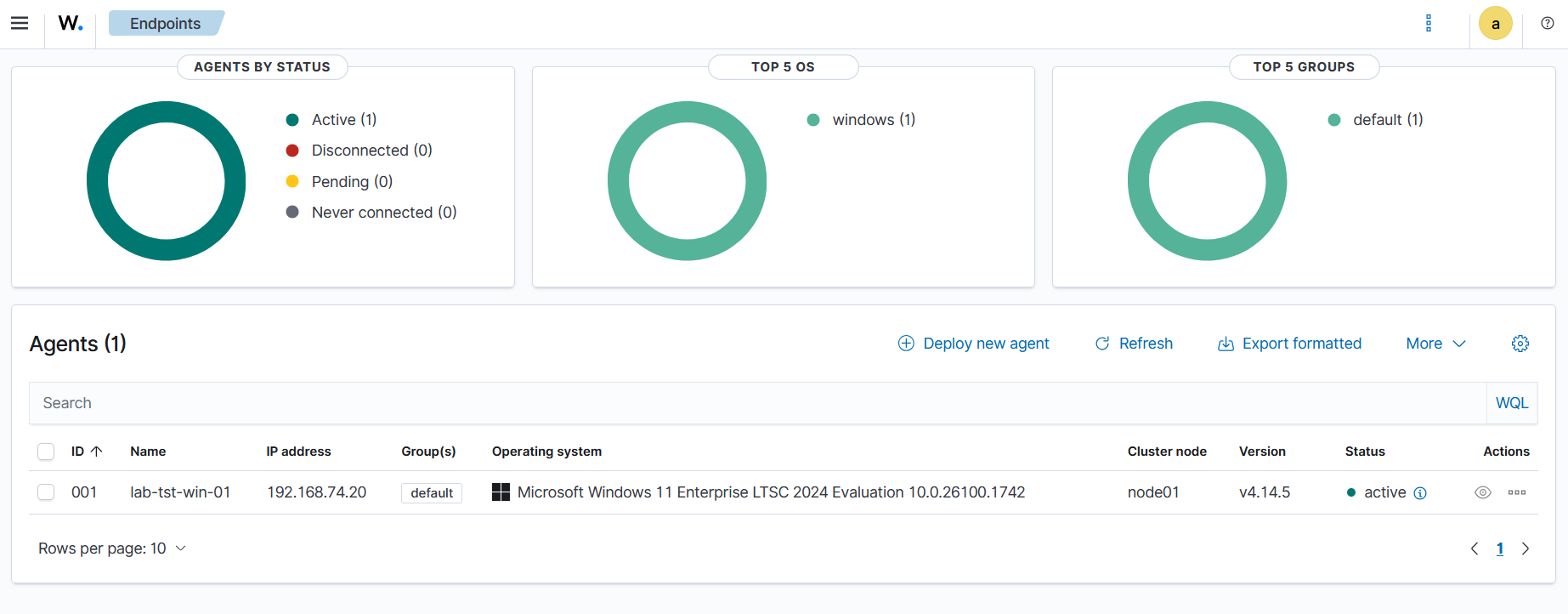
To bridge the tools, I modified the Wazuh agent’s ossec.conf file to explicitly ingest the Microsoft-Windows-Sysmon/Operational event channel, successfully routing deep-level kernel telemetry over Port 1514 to the SIEM.
Roadblocks & Troubleshooting
Wazuh Agent XML Configuration Failure
- Issue: After modifying the
ossec.conffile to ingest Sysmon logs, the Wazuh agent service unexpectedly stopped, and the endpoint showed as “Disconnected” in the SIEM dashboard. - Investigation & Resolution: I utilized PowerShell (
Get-ServiceandGet-Content) to query the agent’s internal logs. I discovered that when adding the Sysmon event channel, I accidentally overwrote the default<location>Application</location>tag. This malformed the XML structure, causing the agent’s internal parser to panic and shut down the service. I opened the config file, restored the default Windows log blocks, appended the Sysmon block correctly to the end of the file, and restarted the service (Start-Service WazuhSvc). The agent immediately established a connection with the SIEM.
Visual Proof of Work
Successful integration: The neutralized Windows endpoint securely shipping Sysmon telemetry to the SIEM.